

Let’s take a moment to define CDN. The term Content Delivery Network(CDN) refers to a geographically distributed group of servers that caches content close to end consumers. A CDN enables the rapid delivery of assets required for the loading of Internet content, such as HTML pages, JavaScript files, stylesheets, pictures, and videos.
Content Delivery Networks (CDNs) store web pages, images, and videos on proxy servers situated near your geographical location. This proximity allows you to watch movies, download software, check your bank balance, engage in social media posts, or conduct transactions without experiencing delays in accessing the content.
How does this CDN work?
A Content Delivery Network (CDN) serves to decrease latency, which is the time it takes for data to travel from one location within a network to another, thus impacting user experiences. Latency is often measured between a user’s device and a central data center, which provides developers with information about the expected loading time of webpages or applications for users.
While internet data travels at the speed of light, physical distance and delays caused by internet infrastructure components contribute to latency that cannot be eliminated. Nonetheless, efforts can be taken to reduce this latency in order to improve user experiences.
Invalidating files in Amazon CloudFront
To invalidate files, you can specify either the path for individual files or a path that ends with the * wildcard, which might apply to one file or many, as shown in the following examples:
/pictures/picture1.jpg
/pictures/pictures*
/pictures/*
The expense of file invalidation
AWS CloudFront charges for invalidation requests beyond the first 1000 paths each month. While invalidating a single path counts as one request, invalidating all files using “/*” still counts as one request. However, frequently invalidating large amounts of content can quickly add up costs. If you use a wildcard (e.g., /images/*) to invalidate all files in a directory without specifying each file, it counts as a single invalidation request. This can be much more cost-effective if you’re dealing with a large number of files, especially if it keeps your total number of invalidation requests under the free monthly quota.
However, keep in mind that this approach can also have downsides. While it may save on invalidation costs, it can lead to temporary slowdowns in your application and increased load on your origin server since all files will be invalidated and subsequently re-fetched from the origin server upon the next request.
As a best practice, try to strike a balance by invalidating only the content that truly needs to be refreshed. Use wildcards strategically when it makes sense.
Invalidating files using the console
Do the following to invalidate files using the CloudFront console.
Step 1: Navigate to AWS Management Console and open the CloudFront console
Step 2: Determine the distribution you wish to invalidate files for.
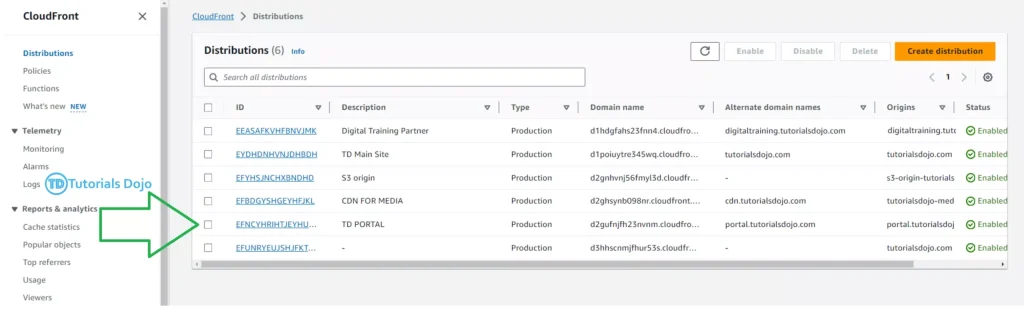
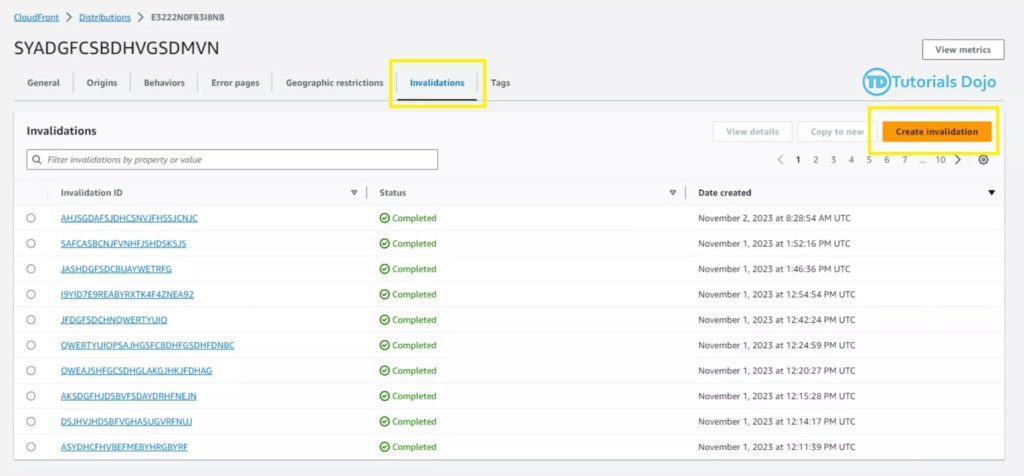
Step 3: Go to the Invalidations tab and click the Create Invalidation button.
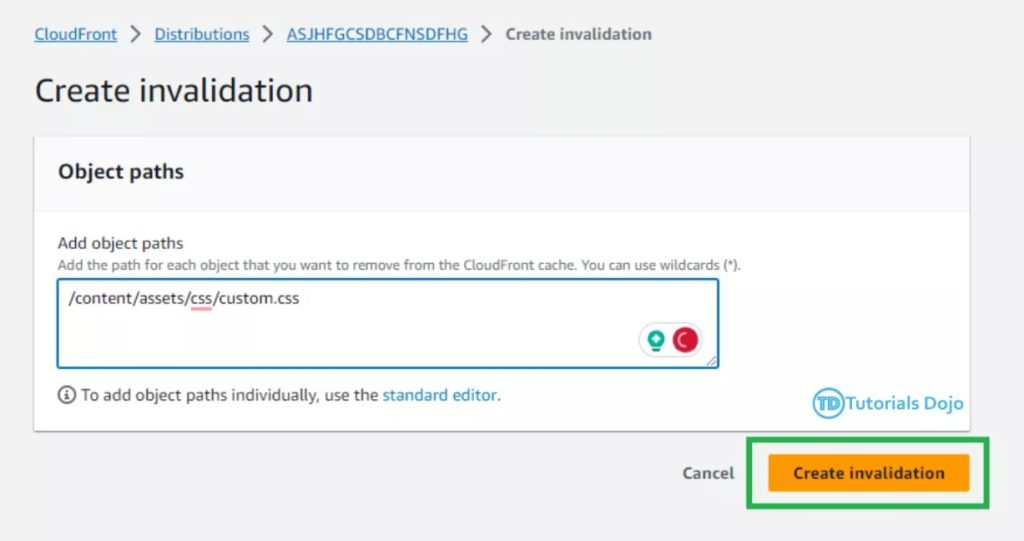
Step 4: For each file you want to invalidate, enter one invalidation path per line.
Note: Specify file paths carefully. You can’t cancel an invalidation request after you start it.
Copying, editing, and rerunning an existing invalidation
Step 1: Choose the distribution containing the invalidation you want to duplicate.
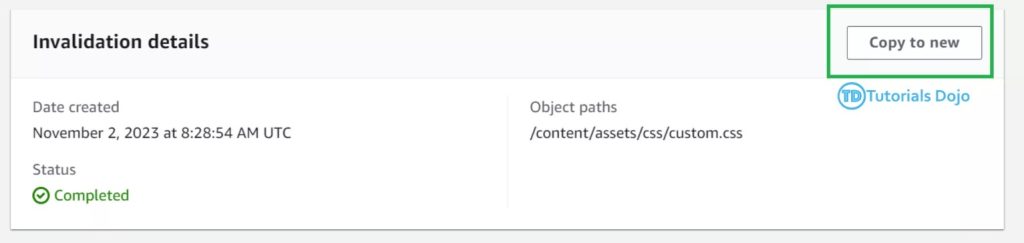
Step 2: Go to the Invalidations tab, choose the invalidation you wish to copy, and then click Copy to new.
Step 3: You may modify the invalidation path by clicking Create Invalidation and waiting for the status to complete.
The importance of invalidating files as it enables us to consistently serve the most up-to-date content to our users. When updates are made to files like HTML pages, JavaScript, stylesheets, images, or videos, CDN invalidation ensures that the most recent versions are given to visitors as quickly as possible. This not only guarantees that our content is always up to date but also helps us prevent the persistence of stale content, a common concern in caching methods. We maintain a dynamic and fresh user experience through the use of CloudFront invalidation, guaranteeing that users receive the most recent content every time they make a request.
Overall, the primary function of a CDN is to increase data transmission speed by shortening the physical distance between the user and the content. Furthermore, in the context of AWS’s CloudFront, the article provides a comprehensive, step-by-step tutorial on how to invalidate files, providing customers with a practical strategy for properly managing and renewing cached content.

Leave a Reply